


Kidduca: Kids Learning Games
4.33.00 Reviews
App Specs
- Version
- 1.7.27
- Updated On
- License
- Free
- Downloads
- 10,000+
- Developer
- Play & Learn: Online Educational Apps for Kids 2–7
- Categories
- Educational
- Platform
- Android
Screenshots
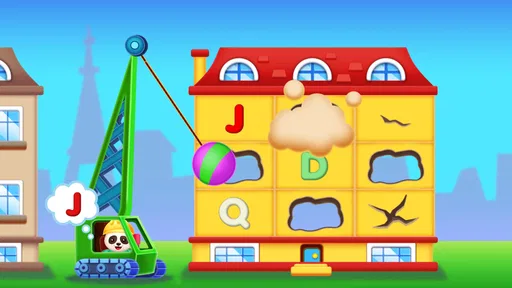
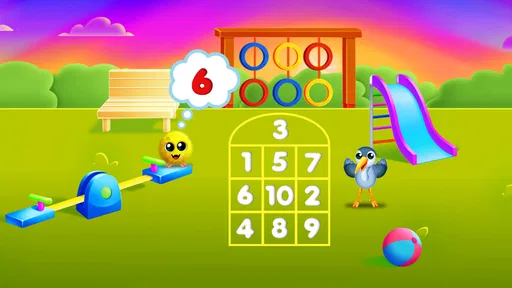



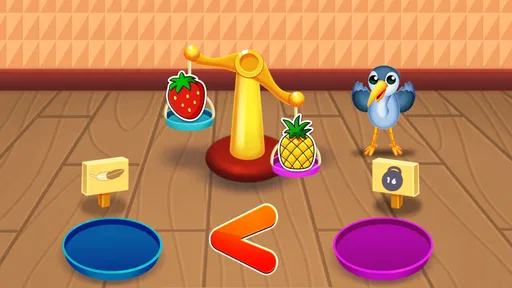
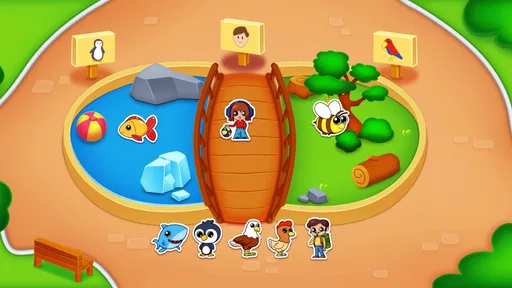

 Analysis by AppCompare
Kidduca: Kids Learning Games is the kind of educational game I would consider for a short, supervised learning session rather than as a digital babysitter. Its focus is early learning for toddlers from age two, with activities built around familiar foundations such as numbers, letters, shapes, colors, and puzzles. That combination makes the game easy to understand at a glance, but the real question is whether its presentation keeps a young child interested without turning practice into noise.
After spending time with it, my overall impression is positive but specific: this is best viewed as a gentle introduction to structured play. It is aimed at children who are beginning to recognize basic symbols and categories, and it gives parents a simple way to bring those ideas into a phone or tablet session. I would recommend it most to families looking for a straightforward starting point, especially when an adult is nearby to talk through what the child is seeing.
My first impression of the learning experience
The first thing I noticed is how clearly the game sits between a toy and a lesson. It does not ask a toddler to understand complicated rules before getting started. The subject matter is immediately recognizable: a child can encounter letters, numbers, colors, shapes, and puzzles without needing a long explanation from a parent. That matters at this age, because the best early-learning activity is often the one a child can approach with curiosity instead of hesitation.
The store’s short description is simply “Kidduca,” while the fuller description points toward early learning for toddlers aged two and above. In practice, I would treat that age guidance as a starting point rather than a guarantee that every activity will suit every two-year-old. Some children at that stage are still developing the hand control needed for accurate tapping, while others may already want more challenging matching or counting tasks.
One useful way to introduce it is to avoid opening it during a rushed moment and expecting independent progress immediately. I would sit with a child for the first session, watch which activities attract attention, and use the game as a prompt for conversation. If a color appears, name an object in the room with the same color. If a letter comes up, connect it to a familiar name. This turns the screen from an isolated exercise into a small part of a wider learning routine.
The game is free to download, which makes trying it relatively easy for families who do not want to commit before seeing whether a child responds well to the style. There are in-app purchases ranging from $6.99 to $55.99 per item, so I would check the purchase controls before handing over the device. The free entry point is helpful, but parents should still decide in advance whether paid content fits their budget and their child’s needs.
Kidduca has an average rating of 4.3 from around 126 ratings, and it has passed 10 thousand installs. Those figures suggest that it has found a modest audience, but I would not use them as a substitute for watching a particular child play. Early-learning apps can be very personal: a visual style that feels welcoming to one toddler may feel distracting or too slow to another.
Worth Reading Before You Choose

Flipboard Shows What News Apps Must Do Beyond the Feed

Switching to Android Auto Means Rethinking Your Driving Routine

Google Calendar Makes a Crowded Week Easier to Manage

Ludo King Makes the Most of the Minutes Between Plans

Baby Panda World Brings Quick Play to Modern Phones, but Its Game Library Feels Busy

ESPN’s Live Game View Makes Following Close Games Easier
Who will get the most from it
I think it is particularly suitable for preschool children who are starting to distinguish basic visual categories, recognize some letters or numbers, and enjoy short puzzle-like tasks. It may also work well for siblings at slightly different stages if an adult adjusts the activity and asks each child to explain what they see. The older child can practice naming or sorting, while the younger one can focus on simple recognition.
It is less suitable for a child who already needs advanced reading, writing, or mathematics practice. The subject range is deliberately foundational, so a child looking for longer stories, open-ended creativity, or substantial progression may outgrow it quickly. I would also skip it as a primary choice for families seeking a completely hands-off experience. Even a well-designed early-learning game benefits from an adult who can notice confusion, limit session length, and connect digital examples to real life.
How the visual world supports the activities
The art direction has an important job here: it needs to make letters, numbers, shapes, colors, and puzzles feel like parts of one friendly world rather than unrelated worksheets. Kidduca’s appeal comes from that broad early-learning palette. The visual language is aimed at recognition first, so the child can concentrate on identifying the target instead of decoding a complicated setting.
I found that this kind of presentation works best when the screen gives one clear idea at a time. Toddlers do not need a crowded interface to feel entertained. They need a visible goal, an understandable response, and enough repetition to build confidence. In a game centered on foundational concepts, restraint is more valuable than visual spectacle. If every element competes for attention, the child may remember the animation but miss the lesson.
The use of shapes and colors is especially important because these are not only subjects to memorize; they are also visual tools that help children interpret the rest of the interface. A child who is still learning the difference between a circle and a square can use that knowledge in sorting and puzzle activities. In that sense, the visual design can reinforce the mechanics when it keeps the objects recognizable and avoids unnecessary decoration.
My practical advice is to watch for whether your child taps randomly or looks carefully before responding. Random tapping is not automatically a problem, but it can show that the screen is being treated like an arcade toy rather than a learning aid. When that happens, I would slow the session down and ask the child to point to the answer before touching it. That small change makes the visual information part of the activity instead of something passed over on the way to the next response.
Another useful approach is to use the game away from the screen. After a short session, ask the child to find a triangle, a red object, or a number they recognize in the room. This helps reveal whether the visual concepts are transferring beyond the device. It also prevents the game from becoming the only place where the child practices. For me, that transfer is a better measure of value than whether a child simply completes an activity quickly.
Where the setting helps and where it may feel limited
The setting is intentionally broad rather than story-heavy. That is a strength for a child who wants to move directly into a matching or recognition task, because there is less narrative information to remember. At the same time, children who are motivated by characters, exploration, and pretend play may find the experience less emotionally rich than a story-led alternative.
This is one of the main trade-offs. A strongly themed game can create excitement and encourage a child to return, but it can also make the educational purpose less visible. Kidduca takes the opposite route: the learning subjects stay in the foreground. I prefer that clarity for a first introduction to digital learning, although I would pair it with physical books, blocks, drawing, and conversation if a child needs more imaginative variety.
The developer is Play & Learn: Online Educational Apps for Kids 2–7, which gives the product a clearly defined audience. That age range also helps explain why the game feels more appropriate as a foundation builder than as a complete curriculum. Parents should think of it as one tool in a preschool routine, not as a replacement for hands-on play or interaction with an adult.
Sound, rhythm, and the pace of play
Sound and pacing matter just as much as the pictures in a toddler game. Young children can lose focus quickly, but constant stimulation can be just as unhelpful as a slow response. The most coherent mood for this type of app is one that feels encouraging and calm enough for a child to think. I paid attention to whether the activity seemed to invite another attempt or merely push the child forward.
For a parent, pacing is also about knowing when to stop. A child may appear engaged while actually becoming tired or frustrated, especially during repeated mistakes. I would use short sessions and finish after a successful moment rather than waiting for the child to become restless. That approach makes the game feel like a positive routine instead of a test that has to be endured.
The rhythm of recognition activities can be useful because repetition gives a toddler time to connect a word with an image. However, repetition needs a little variation to stay meaningful. If your child answers correctly only because the layout has become familiar, pause and ask the question in your own words. For example, instead of asking which item is blue, ask the child to find something blue nearby and then return to the activity. This keeps the learning active rather than purely procedural.
I would also keep the device volume modest. A young child does not need loud feedback to understand that an answer was accepted, and a lower volume makes it easier for a parent to speak during play. The adult voice is often the most valuable sound in an educational session because it can explain why an answer works, not just signal that it was selected.
Families should decide whether the game’s pace matches their child’s temperament. A patient child may enjoy repeating a small set of concepts, while a very energetic child may need a more physical alternative between sessions. I would alternate screen play with movement: count steps, sort toys by color, or draw the shapes encountered in the game. That rhythm gives the digital activity a clear place without allowing it to dominate the day.
How the mechanics fit early learning
The mechanics are built around familiar early-learning actions rather than complex game systems. Numbers, letters, shapes, colors, and puzzles naturally support recognition, matching, and basic problem solving. That makes the game approachable, but it also means the quality of the experience depends on how thoughtfully a child engages with each task.
One of the strongest uses is as a warm-up before a more hands-on activity. I might use a short session about shapes and then bring out paper and crayons. The child can draw a circle or square, compare the result with objects on the screen, and discover that a shape is not just a picture to tap. Similarly, a number activity can lead into counting spoons at the table. These transitions are where I see the greatest educational value.
A second useful workflow is to let the child choose between two areas rather than giving unlimited access. Offer letters or colors, for example, and ask the child to explain the choice. This gives a toddler a small sense of control while keeping the session focused. It also helps a parent identify genuine interests. If a child repeatedly chooses puzzles but avoids letters, that may be a cue to introduce letter practice through books or name games instead of forcing the least popular activity.
A third insight is that accuracy should not be the only goal. Watch how the child reaches an answer. Does the child compare the shapes, say the letter aloud, or count each object? If the child succeeds through guessing, ask for a simple explanation before moving on. This turns a basic game interaction into an opportunity to observe understanding, which is much more useful than assuming that every correct tap represents mastery.
The game’s free price makes it a low-risk experiment, but the in-app purchase range means the experience may involve decisions beyond the initial download. I would let the adult manage any purchase process and avoid presenting paid access as a reward for completing activities. For a toddler, learning should not become associated with pressure to unlock something. First decide whether the free experience fits your routine; only then consider whether additional spending is worthwhile.
On Android, the listed minimum operating system is version 8.0, and the current version is 1.7.27. That makes checking the device before installation a sensible first step, especially if the child will use an older phone or tablet. I would also test the game on the exact device intended for the child, because screen size and touch accuracy can affect whether a toddler feels capable or constantly misses the target.
How it compares with common alternatives
Compared with alphabet-only or counting-only apps, Kidduca offers a wider introductory mix. That is convenient for parents who want several early concepts in one place, and it lets a child move to a different type of activity when attention fades. The trade-off is that a specialist app may provide a deeper routine for one skill, particularly when a child needs focused practice with letter sounds or number formation.
Compared with physical flash cards, it provides immediate interactive feedback and can make repetition feel more playful. Flash cards, however, are easier to adapt in conversation and do not require a charged device. Compared with a storybook app, Kidduca is more direct and skill-centered, while a story app may offer richer language, imagination, and listening practice. I would choose between them based on the goal of the session rather than assuming one format is universally better.
Compared with open-ended drawing or building apps, it gives the child clearer right-or-wrong tasks. That clarity can help with recognition, but open-ended tools are better when the aim is creativity or self-expression. In my view, Kidduca works best in a balanced rotation: use it for brief guided practice, then move to physical or imaginative play where there is no single correct answer.
My atmosphere verdict for parents
Kidduca creates its strongest mood when its visual subjects, gentle learning purpose, and manageable pace all point in the same direction. It feels most useful as a calm introduction to basic concepts, not as a high-energy game designed to hold attention for long stretches. The coherent part of the experience is its focus: the activities stay close to what a young child is beginning to learn.
I would recommend it to a parent who wants a free starting point for short sessions and is comfortable staying involved. It is especially practical for a quiet morning activity, a brief transition before preschool preparation, or a few minutes of guided practice while traveling. In each case, I would set a clear endpoint and follow the screen activity with a real-world example.
I would be more cautious for families looking for advanced progression, a substantial story world, or a fully offline alternative built around physical materials. Children who need stronger phonics instruction, handwriting practice, or richer creative play will likely need other tools alongside it. The broad subject mix is useful for exploration, but it should not be mistaken for depth in every individual skill.
The age rating is Everyone, which fits the accessible educational focus, and the game is presented for children from age two. Even so, age labels cannot account for differences in attention, motor control, language development, or family routines. I would judge suitability by observing the child’s response: interest, understanding, and comfort matter more than simply meeting the age recommendation.
My final recommendation is to treat Kidduca: Kids Learning Games as a companion to active parenting, not a replacement for it. Its best feature is the way it gathers several preschool ideas into an approachable play space. Its main limitation is the same broadness that makes it convenient: children who need specialization or more imaginative depth will soon need something else. If you keep sessions short, connect activities to everyday objects, and manage purchases carefully, it can earn a useful place in an early-learning routine.
For me, the deciding question is simple: does the child leave the session noticing more in the real world? If a game about colors leads to sorting toys, a puzzle leads to careful comparison, or a number activity leads to counting at the table, then the screen has done something worthwhile. That is where this educational game feels most successful—not when it fills time, but when it gives a toddler a small, understandable reason to look, name, compare, and try again.
Pros
- Fun mini-games make early learning feel engaging rather than like homework.
- Covers several basic skills
- including letters
- numbers
- colors
- and simple logic.
- Bright visuals and friendly characters are appealing to younger children.
- Simple controls let preschoolers play with little help from adults.
- Short activities work well for quick learning sessions or travel entertainment.
Cons
- Some activities may become repetitive after extended play sessions.
- The educational depth may be limited for children who already know the basics.
- Parents may want clearer progress reports to track individual learning goals.
- Certain content or features may require in-app purchases or subscriptions.
- Audio
- ads
- or notifications could be distracting depending on the app version.
FAQs for Kidduca: Kids Learning Games
What is Kidduca: Kids Learning Games?
Kidduca: Kids Learning Games is an educational app designed to make early learning more enjoyable through interactive activities and simple games. It generally focuses on skills such as recognizing letters and numbers, matching, memory, colors, shapes, and basic problem-solving. The activities are presented in a child-friendly format, making the app suitable for young children who are beginning to explore digital learning independently or with parental guidance.
What age group is Kidduca suitable for?
Kidduca is mainly intended for preschool and early elementary-age children, although the ideal age can vary depending on a child’s reading ability, attention span, and previous experience with learning apps. Younger children may need an adult to explain instructions or help them navigate the menus, while older children may use the easier activities for revision. Parents should check the app’s current store description for the recommended age range.
Does Kidduca require an internet connection?
Some Kidduca activities may be available after installation without a constant internet connection, which can be useful for travel or limiting online access. However, an internet connection may still be required for the initial download, updates, advertisements, account-related features, or additional content. Before giving the device to a child offline, open the app once and confirm which games work without connectivity and whether any content must be downloaded first.
Is Kidduca safe for children to use?
Kidduca is designed as a children’s learning experience, but parents should still review its privacy information, advertising policy, and in-app purchase settings before use. Check whether the app includes external links, third-party advertisements, or requests for personal information. It is also advisable to activate parental controls, disable unwanted purchases, and supervise younger children until you are comfortable with how the app handles navigation and optional content.
Is Kidduca free, and does it include in-app purchases?
The availability of free activities, premium lessons, advertisements, and in-app purchases can depend on the version of Kidduca and the platform where it is downloaded. Some features may be accessible at no cost while additional games or an ad-free experience require payment. Review the Google Play or App Store listing carefully before installing, and use device-level purchase restrictions to prevent accidental transactions by children.


